Photograph By Radovan Magdalenic
Radovan M.
Photograph By Marcos R Fernandes
Marcos R F.
Photograph By Bogdan Zwir
Bogdan Z.
Photograph By Andre Denis
Andre D.
Photograph By . B
. B.
Photograph By Radovan Magdalenic
Radovan M.
Photograph By Barbara Socor
Barbara S.
Photograph By Jan Symank
Jan S.
 
imageopolis Home Sign Up Now! | Log In | Help  

Your photo sharing community!

Your Photo Art Is Not Just A Fleeting Moment In Social Media
imageopolis is dedicated to the art and craft of photography!

Upload
your photos.  Award recipients are chosen daily.


Editors Choice Award  Staff Choice Award  Featured Photo Award   Featured Critique Award  Featured Donor Award  Best in Project Award  Featured Photographer Award  Photojournalism Award

Imageopolis Photo Gallery Store
Click above to buy imageopolis
art for your home or office
.
 
  Find a Photographer. Enter name here.
    
Share On
Follow Us on facebook 


Send this photo as a postcard
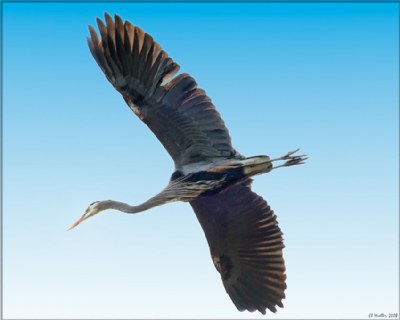
Pterodactyl
 
Image Title:  Pterodactyl
  0
Favorites: 0 
 By: Eb Mueller  
  Copyright ©2008

Register or log in to view this image at its full size, to comment and to rate it.


This photo has won the following Awards


 Projects & Categories

 Browse Images
  Recent Pictures
  Todays Pictures
  Yesterdays Pictures
  Summary Mode
  All imageopolis Pictures
 
 Award Winners
  Staff Choice
  Editors Choice
  Featured Donors
  Featured Photographers
  Featured Photos
  Featured Critiques
   
 Image Options
  Unrated Images
  Critique Only Images
  Critiquer's Corner
  Images With No Critiques
  Random Images
  Panoramic Images
  Images By Country
  Images By Camera
  Images By Lens
  Images By Film/Media
   
 Categories
   
 Projects
   
 Find Member
Name
User ID
 
 Image ID
ID#
 
   
 Search By Title


Photographer Eb Mueller  Eb Mueller {Karma:24960}
Project #19 Above Your Head Camera Model D300
Categories Wildlife
Nature
Film Format Nikon NEF
Portfolio Lens Nikon  300mm f/4 ED-IF AF-S Nikkor
Uploaded 4/11/2008 Film / Memory Type Lexar
    ISO / Film Speed 800
Views 745 Shutter 1/500
Favorites Aperture f/11
Critiques 3 Rating Critique Only Image
Location City -  Chilliwack
State -  BC
Country - Canada   Canada
About Great Blue Heron, overhead, composite of two successive exposures. Taken at 510mm.
EXIF Data
Random Pictures By:
Eb
Mueller


Petite Fly

Maid of the Mist

Calm Morning

Camp River Slough 2

In the Blue

Working Bee

Ranch Country 5

Vedder River Morning

Victoria Harbour 12

Mushroom Cap

There are 3 Comments in 1 Pages
  1
Eb Mueller Eb Mueller   {K:24960} 4/14/2008
Hi Tim! Thanks for dropping by since I also like a bit of tech talk. Here is my workflow: In camera my settings for Picture Control is set to Vivid, AdobeRGB colour space and RAW lossless compressed at 14 bit. The Vivid setting is for in-camera preview purposes only since this setting is lost when I import the RAW file into Adobe Lightroom with no sharpening, noise reduction, etc., and automatically converted to Lightroom's native ProPhotoRGB colour space. In Lightroom I do my sorting, rating, cataloging and basic global photographic editing, including the crop. I then open the file in Photoshop CS3 for local editing (still in ProPhotoRGB and 16bit,) apply any specialty filters, resizing and output sharpening. If the editing in Photoshop is extensive, then I will also have a saved a copy of the 16bit Tiff file in my Lightroom catalog. If output to the web, I will have a my file converted to 8bit, JPG, sRGB. My other workflow, which I used a year ago, involved importation into Capture NX for most editing and then output in Photoshop in similar fashion.

I am guessing that your image inconsitency is due to lack of colour management. Your web browser assumes your JPG image is sRGB, whereas you likely saved it as an AdobeRGB in Photoshop. Always convert your final output web images to sRGB colour space before saving, (EDIT > CONVERT TO PROFILE > select sRGB.) The other factor is a calibrated monitor. Given that both are taken care of, there is no reason for your web image to not be very close to how you saw it in Photoshop. However, I do recommend keeping your Photoshop colour space as AdobeRGB for the wider colour gammut it provides. ProPhotoRGB is an even wider gammut which I prefer to use for my printing output. Let me know how it works for you!

I have not yet switched to Vista and see little reason to do so until I get the complimentary copy that I won as a door prize. I will likely operate with a dual boot configuration, retaining Windows XP until everything runs smoothly in Vista.
Eb

  0


Tim  Schumm Tim  Schumm   {K:29196} 4/13/2008
the auto focus on the D300 is super! Are you using Microsoft Vista? just got a new system and it is a bit wacky for me still...i feel like a Ludite with all the new tech stuff needing fresh understanding...lol. Having a bit of trouble getting Photoshop to create a consistent image when saved to the hard drive. It comes out lighter and less saturated then when in photoshop. Also are you shooting RGB or sRGB?
  0


Dave Stacey Dave Stacey   {K:150877} 4/12/2008
He does look a little prehistoric, Eb, but you got a very nice shot!
Dave.

  0


  1


|  FAQ  |  Terms of Service  |  Donate  |  Site Map  |  Contact Us  |  Advertise  |

Copyright ©2013 Absolute Internet, Inc - All Rights Reserved

Elapsed Time:: 0.2421875